Chipotle Steak Bowl
Make now35 min
Every recipe you love, in one place.
Paste a link from Instagram, a food blog, anywhere — and it comes back as a real recipe: ingredients, steps, photo. Not a screenshot you'll never open again.
See a recipe on Instagram or a blog? Tap Share and pick The Pantry Butler. No screenshots, no copy-paste.
Ingredients, steps and the photo, pulled out and filed in your cookbook — searchable, and yours to keep.
A shopping list in one tap — and when you want it, tell us what's in your kitchen and we'll show you what you can make tonight.
Most recipe apps treat a creator as a URL to strip out. A recipe arrives, the name falls off, and the person who spent a Sunday testing it never hears about the twelve kitchens it landed in. We built the opposite.
“Saved from” sits under the title and is tappable — one tap opens that creator's whole collection, and every recipe keeps a link straight back to the post it came from.
Finish a recipe in Cook Mode and you can send the creator a photo of how yours turned out. No other recipe app can, because no other one knows you actually cooked it.
When Claude or ChatGPT answers from your kitchen, the creator's name and original link travel with the recipe. Their work gets attributed, not absorbed.
For cooking creators
Every subscriber you bring pays you 30% of what they pay us, for as long as they stay — and the rate is locked for good. Ten places, then the founding tier closes. You get a verified collection page, honest numbers about how your recipes are doing, and a say in what we build next. Apply to be a founding creator →
Connect The Pantry Butler to Claude, ChatGPT or Meta Muse and ask it what you can cook tonight. It answers from what’s actually in your kitchen — not from a search of the whole internet.
Works with
Your own saved recipes, ranked by how much of each you already have — and what you’d need to buy.
Say it however you’d say it out loud. It lands in the right place.
So the spinach gets eaten instead of binned.
Every other recipe app can tell an assistant what recipes exist. Only this one knows what’s in your cupboard. Connect yours →
Everything from the web app, redesigned for your phone — plus a home-screen widget, a Share button to save recipes straight from TikTok, Instagram or Safari, and Olive, your AI kitchen sidekick.
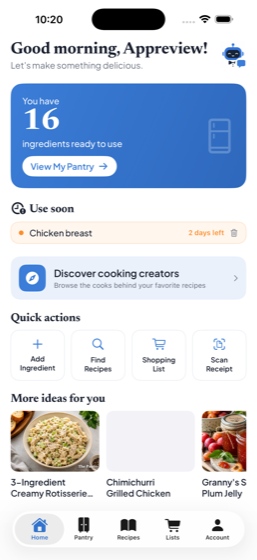
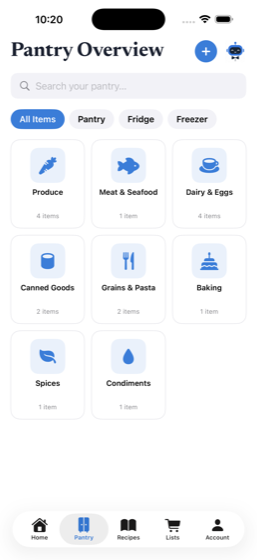
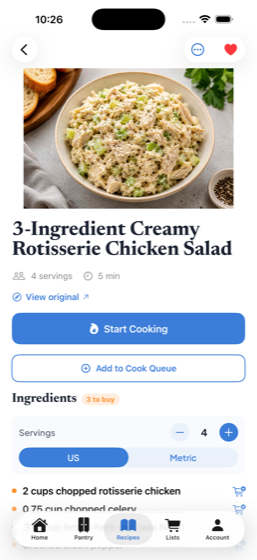
20 saved recipes and 10 Olive AI actions a month, free forever. Go Premium for unlimited recipes, unlimited Olive, and a shared Family Pantry — 7 days free, then $49.99/yr.
Your kitchen
Paste a recipe from a video or link — Olive pulls out the ingredients and steps, then tells you what you can cook from what's already on your shelf.
On desktop, drag Save recipe to your bookmarks bar. On your phone? Set up Share →
How it works
Paste any cooking video or link. We read it and pull out the ingredients and steps — no retyping, no losing it to the scroll.
Tell us what's in your kitchen. We show the recipes you can make right now — and exactly what you're missing.
Pick a few recipes to batch-cook together, with the make-ahead steps surfaced first.
Get a grocery list of only what you don't already have — grouped by aisle, ready to go.
Everything Olive handles
Paste a TikTok, Instagram or Facebook link and Olive pulls out the ingredients and steps — no retyping, nothing lost to the scroll. When a creator keeps the recipe on their blog, share that link instead.
Tell Olive what's in your kitchen and she shows exactly what you can make right now — and the few things you're missing.
"Easy dinner with chicken and rice?" Chat with your AI butler for instant ideas built from what you already have.
Olive tracks freshness and nudges you to use what's about to expire first — less waste, more dinners already handled.
Invite your family to one shared pantry and cookbook. Everyone sees what's on hand and what to cook — no more "what's for dinner?"
Build one combined list of only what you're missing, grouped by aisle — then copy it straight into any grocery app.
Pick a few recipes to batch-cook together and Olive lays out one plan with the make-ahead steps first.
Mark recipes as family heirlooms, add who they came from — and when you've collected enough, print a beautiful family cookbook to pass down.
Simple pricing
$0/forever
7 days free, then $49.99/yr
Cancel anytime — no contracts.
Veg-forward and Light on salt are rough guides based on which ingredients appear in a recipe — we don’t measure sodium or nutrients. They are not nutritional claims, and not medical or dietary advice.
No recipes yet
Paste a link above to gather your first recipe.
About
Share the tools and ingredients you love — with your own affiliate links.
Some links here are affiliate links — I may earn a small commission, at no cost to you.
The Discover
A shared collection anyone can browse. Tap Save to plant a copy in your recipes.
These are recipes members saved and chose to share. A recipe's ingredients and method are facts and instructions — not owned by anyone — and that's what you see here. Photos stay with the person who took them, so a creator's own image never appears unless they've partnered with us. Every recipe credits its source where we know it.
If you're a creator and you'd rather your recipes weren't here, tell us and we'll remove them.
Saved by other people in the last seven days.
The wild is quiet
No public recipes yet — be the first to share one from your recipes.
Cooking creators
Meet the creators our community loves. Tap any creator to see their whole collection — and follow them where they cook.
Creators more than one cook discovered in the last 30 days.
No creators yet
As cooks share recipes, the creators behind them show up here to discover.
Your family cookbook
Recipes anyone in your household marked Share with family live here. Tap Save to keep a copy in your recipes.
No family recipes yet
Open a recipe, tick Share with my family, and it'll appear here for your household. Invite family from the Pantry page.
Everything you have — and what you can make right now.
Fastest way: tap the microphone on your phone keyboard (or the Dictate button) and just rattle off what you've got. Just did a voice memo? Paste the transcript here — Olive figures out the rest.
Forward your grocery-order emails and Olive fills your pantry automatically — Walmart, Instacart, Kroger, any store. Premium.
Orders from an address you haven't confirmed are ignored — nothing enters your pantry unless it's from an email you added.
No imports yet. Scan a receipt, paste a list, or forward an order and it'll show up here.
Frozen a while — tap to find a recipe to use it up.
Add a few ingredients
We'll surface recipes you can make right now.
My Household
Everyone in your household shares this list — add what you need and see who added what.
Select recipes in Recipes, then tap Shopping list — ingredients merge across recipes and sort by aisle.
Your month in cooking
Select a few recipes in My Recipes, then come here — you'll get one plan with the make-ahead steps first (perfect for a Sunday prep day). Or just cook one meal — up to you.
Couldn't read that link? Paste the recipe — caption, description, or the whole thing — and we'll fill it in.
Your photo
Cooked it? Add your own shot.
By adding a photo, you confirm it's your own — or that you have permission to share it. See our Terms.
Original handwritten card
Have the original? Preserve the handwriting.
Every meal you log goes in your cooking diary — with a note, whether you’d make it again, and who you cooked it for.
After a few, it starts telling you things: the dishes you keep coming back to, the ones you have not made in a while, and what you could cook tonight from what is already in your kitchen.
is in your . Anything you want to remember for next time?
Sized for Instagram, TikTok or Facebook stories, with the recipe name on it.
You just cooked . Send a photo of how it turned out — they’ll see your name and your note.
Only this creator sees it. Nothing is posted publicly, and skipping sends nothing.
New here or coming back — no password. We'll email you a one-tap link and a 6-digit code; use whichever's handier.
Add amounts to pantry items (like “3 lemons” or “2 lbs flour”). Optional — leave off to keep your kitchen simple.
Share your link. When a friend upgrades to Premium, you both get a free month.
Terms · Refunds · Privacy · Disclosure
Soonest first. Dates are estimates from the item and where it’s stored — if you can read the packet, set the real date and we’ll use that instead.
This is permanent and cannot be undone.
Deleting your account erases, for good:
You have an active subscription. Cancel it first under Manage subscription — deleting your account here does not stop billing.
Try Premium free for 7 days. Unlimited recipes, unlimited Olive, and a pantry the whole family shares. Cancel any time before it renews and you won't be charged.
Free for 7 days · Cancel anytime · 30-day money-back guarantee
By subscribing you agree to our Terms & Refund Policy.
Check the list, fix anything Olive misread, then add it to your pantry.